
The best nonprofit CRM is more than a digital address book. CRM optimization for a nonprofit means using one platform to manage supporter, volunteer, and partner information, so teams can work from shared records instead of disconnected files. A well-organized system makes relationships easier to understand and information easier to maintain.
When comparing CRM tools, look beyond feature lists and consider how each option supports your team’s daily work. This article explains what nonprofit CRM software does, how centralized records can help, and what to assess when choosing a system. Use these criteria to identify a platform that fits your organization and supports sustainable resource development.
Key Takeaways
- Compare CRM options by how well they bring supporter, volunteer, and prospect records together for everyday use.
- Look beyond contact storage to see how a system can support relationship management and resource planning.
- Prioritize the capabilities that fit your organization’s workflows, team needs, and long-term direction.
- A Resource Development Audit can help identify where stronger systems and strategies could support sustainable growth.
Centralized donor, volunteer, and prospect records
For any nonprofit organization, CRM optimization begins with organized constituent records. Protect donor details through encryption, secure hosting, clear access permissions, and privacy practices suited to applicable obligations.
Constituent Data Centralization
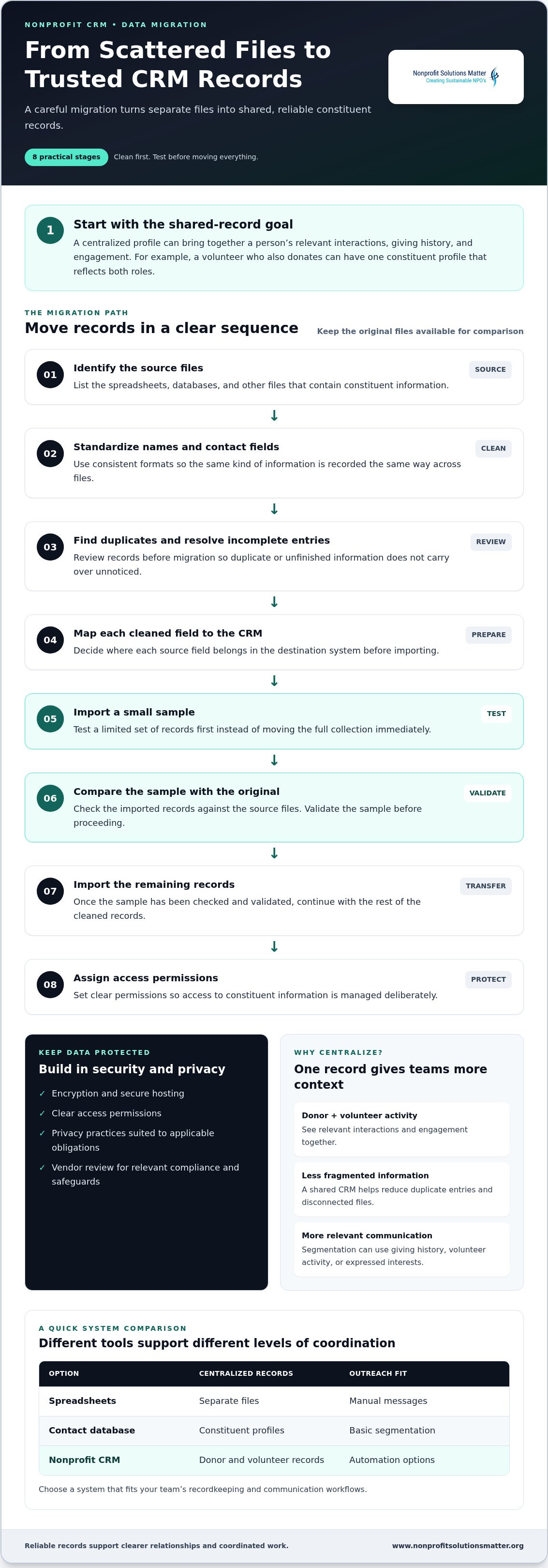
A centralized record brings together each donor’s, volunteer’s, or prospect’s relevant interactions, giving history, and engagement. Unlike separate spreadsheets, a shared CRM helps staff see relationships in context and reduce duplicate entries. For example, a volunteer who donates can have one constituent profile that reflects both roles, rather than disconnected records that obscure their involvement.
Donor Segmentation and Outreach
Segmentation groups people by useful characteristics, such as giving history, volunteer activity, or expressed interests. It helps teams turn centralized records into relevant communications, such as event updates for volunteers and acknowledgments for recent donors. Automate routine messages where appropriate, then review responses and interactions to guide stewardship, recruitment, and retention.
CRM Data Cleaning and Migration
Migration emphasizes reliable records, rather than outreach or ongoing storage. Start by identifying the source files, then standardize names and contact fields, find duplicates, and resolve incomplete entries. Map each cleaned field to the destination CRM, import a small sample, and compare it with the original. After validating the sample, import the remaining records and assign access permissions.
For growing organizations, document applicable privacy obligations based on their operations and data. When partnering with Nonprofit Solutions Matter, Inc., assess CRM vendors for relevant compliance, encryption, secure hosting, and clear permissions.
| Option | Centralized records | Outreach fit |
|---|---|---|
| Spreadsheets | Separate files | Manual messages |
| Contact database | Constituent profiles | Basic segmentation |
| Nonprofit CRM | Donor and volunteer records | Automation options |
Choose a system that fits your team’s recordkeeping and communication workflows.
What is CRM software for nonprofits?
A nonprofit CRM is a platform for managing relationships with supporters, volunteers, and partners. It connects contact records with engagement, campaigns, and giving activity.
Unlike a basic database, a CRM can connect donor interactions with events, memberships, and volunteer participation. Accounting integrations can help align donation records with financial reporting, while staff use separate systems for other tasks.
Major-Gift and Prospect Management
A CRM can organize prospect research and major-gift relationships without managing every constituent workflow. Teams can record a prospect’s connection to the organization, past interactions, and next steps. This context helps staff plan personal conversations and track progress without treating a potential gift as guaranteed revenue.
CRM subscription costs depend on users and features, while implementation and maintenance costs are shaped by migration, integrations, and staff training. Nonprofit discounts or grants may be available through software programs, with eligibility and terms varying. Compare platforms against your accounting tools, donor workflows, volunteer needs, and support requirements. No single option fits every organization.
CRM Performance and Optimization Risks
Measure performance against defined goals, such as complete records, timely acknowledgments, donor retention, or staff adoption. Compare those indicators before and after changes, then weigh the results against subscription, implementation, and maintenance costs. Open Research Europe describes a shift from counting activities to tracking journeys, achievements, and long-term impact.
Use real tasks in training, such as recording a donation or logging a volunteer interaction. Assign clear owners for records and avoid common pitfalls: importing duplicates, collecting unnecessary information, or automating messages without reviewing them. These mistakes can undermine relationships and make results harder to assess.
Benefits of CRM tools for nonprofits
For a nonprofit, CRM software supports the mission rather than profit. Its value lies in clearer donor management, coordinated operations, and useful reports. For example, a director can review supporter engagement alongside campaign responses and identify where follow-up needs attention. A shared view helps teams make decisions using the same information.
Integrated records can connect donations with volunteer participation and event attendance. That context helps staff recognize the different ways supporters contribute, not just their latest gift. A volunteer who attends an event and later donates can receive relevant communications. This supports thoughtful stewardship and gives teams a clearer picture of each person’s involvement.
Mobile access lets staff manage resources and interact with supporters away from a desk. M+R Benchmarks reports that mobile devices generated 52% of nonprofit website traffic. That figure describes website visits, not CRM use, but it underscores why mobile experiences deserve attention. Test common tasks, such as viewing a constituent record or logging a conversation, on a phone.
CRM tools can also help organizations track the use of funds and supplies. Teams can review resource flows and utilization, then adjust allocation strategies. For example, a report on supply distribution can inform planning for the next program cycle. These records help connect operational decisions with mission-related work.
To assess a CRM against your budget, establish a practical baseline before changing systems. Track record completeness, follow-up, and staff adoption, then compare reports over time. Treat optimization as a sequence: set priorities, configure workflows, train users, and review results. Choose a system that supports your team’s actual operations without unnecessary complexity.
Nonprofit Solutions Matter: Resource Development Audits
Nonprofit Solutions Matter, Inc. conducts Resource Development Audits for organizations assessing whether their current approach supports sustainable growth. If your CRM records are organized but your team struggles to connect donor engagement, acquisition priorities, and revenue diversification, an audit can help clarify the broader resource development picture.
An audit can help leaders clarify priorities before changing systems or workflows. Its findings can inform decisions about donor relationships and organizational capacity. Executive Coaching & Leadership Development or Board Engagement & Governance Training can also support leadership and governance needs.
Discuss your organization’s priorities with Nonprofit Solutions Matter, Inc. and take the next step toward a Resource Development Audit.
Build a CRM foundation for what comes next
CRM optimization for a nonprofit is more than a software decision. It is an opportunity to align daily practices with longer-term goals. Before making a change, identify which decisions your team needs to make confidently, which relationships it wants to strengthen, and what information leaders need to guide resource development.
Turn those priorities into a manageable plan. Clarify who owns the data, which workflows need attention first, and how the team will measure progress. A thoughtful sequence helps staff adopt changes steadily instead of adding processes without a shared purpose. The goal is a system that supports the mission as the organization grows.
To discuss your organization’s next step, start a conversation with Nonprofit Solutions Matter, Inc. Explore how your priorities, leadership, and systems fit together. Clear direction gives your team a practical foundation for steady improvement.
Next Steps: Discuss your organization’s next step.
Frequently Asked Questions
How can using CRM tools benefit a nonprofit?
A nonprofit CRM helps teams turn routine records into clear next actions. For example, a manager can review unanswered supporter messages, assign follow-up, and track whether commitments were completed. This coordinates engagement across roles and helps leaders spot process gaps before they affect the supporter experience. The value comes from consistent use, not software alone.
How do you choose the best CRM system for your nonprofit?
Map essential workflows before comparing CRM features. List how staff manage a new contact, event registration, donation acknowledgment, and financial reconciliation, then test those tasks in each platform. Assess accessibility, permissions, data export, integrations, and ownership costs, including implementation and maintenance. Choose a tool your team can use consistently, not simply the one with the longest feature list.
How does a nonprofit CRM help with fundraising?
A nonprofit CRM can support resource development by helping staff coordinate prospect follow-up and understand which communications prompt engagement. For example, a team can record a campaign response, schedule a personal conversation, and note the outcome for future stewardship. Use these records to compare outreach approaches and refine the next campaign, while treating each relationship with care rather than relying on automated messages alone.
What are the features of a nonprofit CRM solution?
Useful features can include constituent profiles, gift and interaction histories, segmentation, communication automation, reporting, event registration, volunteer coordination, and accounting integrations. For a small team, prioritize accurate records, clear permissions, and straightforward reports before advanced automation. A feature is useful when it supports a real workflow, has an owner, and gives staff information they can act on.
What does CRM optimization mean for nonprofits?
CRM optimization for a nonprofit means refining the system, data practices, and team workflows to support clear organizational priorities. Start with one recurring task, such as recording event participation, and find where errors or delays occur. Adjust the process, train the people responsible, and review whether records are more complete and follow-up is more consistent. Expand once the revised workflow is working.

Article by
Sharon D Jones
Sharon D. Jones, M.Div., is a globally respected fundraising strategist, nonprofit leadership expert, and capacity-building architect with over three decades of experience. As the Founder and CEO of Nonprofit Solutions Matter, Inc., her proprietary growth frameworks have successfully mobilized nearly $957 million in philanthropic capital for local, national, and international organizations.
General Disclaimer & Disclosure
The information provided on this website is for general informational and educational purposes only. While we strive to keep content accurate and up to date, we make no representations or warranties of any kind, express or implied, about the completeness, accuracy, reliability, or suitability of the information contained herein.
Professional Advice
The content on this site does not constitute professional advice (e.g., legal, financial, medical, or tax). You should consult with a qualified professional before making any decisions based on the information provided on this website. Any action you take upon the information found on this site is strictly at your own risk.
Affiliate & Third-Party Links
Some articles on this site may contain affiliate links. If you click on an affiliate link and make a purchase, we may receive a small commission at no additional cost to you. We only recommend products or services we believe add value to our readers. We are not responsible for the content, privacy policies, or practices of any third-party websites linked within our articles.


